n8n Review (2026): The Best Automation Tool for Developers and Power Users?
n8n is one of the most powerful and flexible automation platforms available - especially for developers and technical users. But it comes with real complexity. This review breaks down when n8n is the right choice and when a simpler tool may serve you better.
📅 Last verified: July 2026
n8n is the best automation tool for developers who want full control over their workflows - but Zapier or Make are better for non-technical users who want speed and simplicity.
⚡ Quick Verdict
n8n is best for developers, engineers, and power users who want complete control over their automation stack - including self-hosting and custom code execution.
It is not ideal for non-technical users or teams that want to get started quickly without writing code or managing infrastructure.
If your goal is full flexibility, open-source freedom, and code-level power, n8n is the best tool available. If you need speed and simplicity, Zapier or Make are better alternatives.
🧩 What is n8n?
n8n (pronounced “n-eight-n”) is an open-source, self-hostable workflow automation platform that lets users build powerful automations with or without code.
Unlike most automation tools, n8n gives users access to a full JavaScript execution environment inside each workflow node - enabling complex data transformations that other tools cannot handle.
n8n supports self-hosting via Docker or Kubernetes, giving teams full data ownership. It also offers a managed cloud version for those who prefer not to manage infrastructure.
n8n is popular among developers because it is open-source, highly extensible, and offers unlimited workflows on the free self-hosted tier.
👤 Use n8n if...
-
check_circle
You are a developer or technical user who wants full workflow control
-
check_circle
You need complex, multi-branch workflows with custom logic
-
check_circle
You want to self-host your automation stack for privacy and cost control
-
check_circle
You need unlimited workflow executions without per-task pricing
n8n is especially strong for:
🚫 Not for you if...
-
cancel
You are non-technical and want a guided no-code setup experience
-
cancel
You need a quick setup without managing Docker or servers
-
cancel
You want access to thousands of pre-built SaaS integrations out of the box
-
cancel
Your team prefers a polished drag-and-drop interface without code
🔧 Key Features
Visual Workflow Canvas
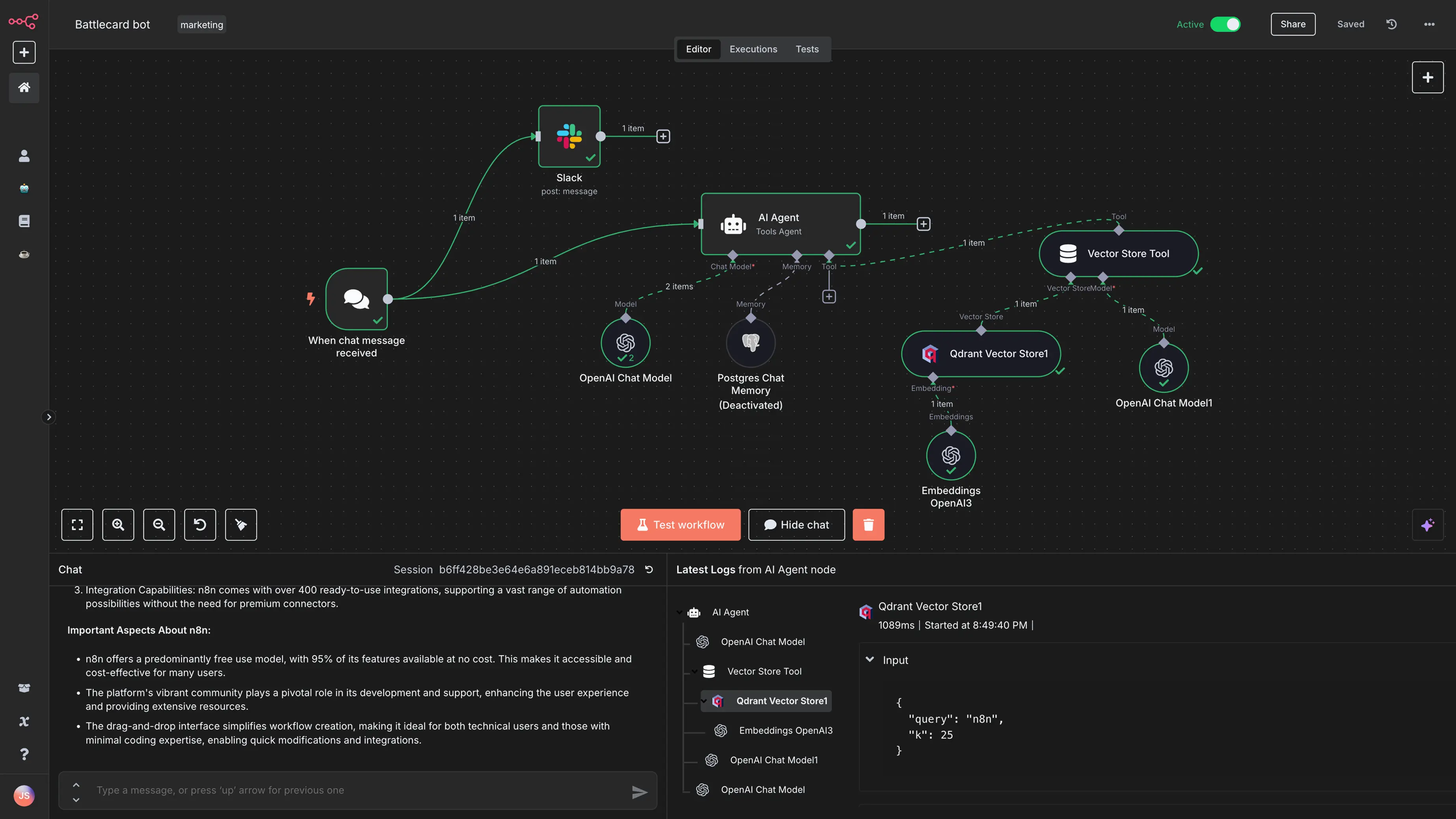
n8n uses a node-based canvas giving you a full visual overview of every workflow step, supporting branching and looping.
300+ Native Nodes
n8n ships with hundreds of native integrations plus HTTP request nodes to connect any REST API without custom code.
Custom Code Nodes
Run custom JavaScript or Python directly inside any workflow node - a capability that sets n8n apart from most no-code tools.
Self-hosting Support
Deploy n8n on your own infrastructure using Docker or Kubernetes for complete data ownership and cost control.
Error Handling & Retries
n8n has built-in error handling, retry logic, and conditional branching that give workflows production-grade reliability.
Unlimited Free Workflows
The self-hosted free tier places no limits on workflows or executions, unlike task-based pricing from Zapier or Make.
🧠 Real-World Use Cases
API Orchestration
Chain multiple API calls with conditional logic, transformations, and error handling in a single visual workflow.
Data Pipeline Automation
Pull data from databases, transform it with custom code, and push it to external services or data warehouses.
Internal Developer Tools
Build internal automation tools, admin scripts, and scheduled jobs without spinning up dedicated microservices.
Self-hosted AI Pipelines
Integrate LLM calls, vector databases, and custom AI logic in a fully controlled, on-premise environment.
💰 Pricing Reality
n8n’s pricing model is fundamentally different from most automation tools. Instead of charging per task, it allows self-hosting, where costs are tied to infrastructure rather than usage.
n8n is exceptional value for technical teams: self-hosting costs only your server bill, while cloud plans are competitively priced compared to Zapier or Make.
The main cost consideration with n8n is engineering time to set up and maintain a self-hosted instance. Teams without DevOps resources may find the managed cloud plan easier to justify. See comparisons in our Zapier review and Make review.
thumb_up Pros
-
+
Fully open-source with no vendor lock-in
-
+
Unlimited workflows on the self-hosted free tier
-
+
Custom JavaScript and Python execution inside nodes
-
+
Self-hosting gives full data privacy and control
-
+
Active open-source community and growing node library
thumb_down Cons
-
−
Steep learning curve for non-technical users
-
−
Self-hosting requires server and DevOps knowledge
-
−
UI is less polished than Zapier or Make
-
−
Smaller native integration library than Zapier
⚖️ n8n vs Alternatives
n8n vs Zapier
Zapier is better for beginners. n8n is better for developers who want code-level control and self-hosting.
Read Comparison arrow_forwardn8n vs Make
Make offers a visual canvas similar to n8n but is easier to use and has a larger native integration library.
Read Comparison arrow_forwardn8n Alternatives
See the best alternatives to n8n for teams that want automation power without the self-hosting complexity.
See Alternatives arrow_forward🏁 Final Verdict
n8n is the best automation tool for developers who want unlimited flexibility, open-source freedom, and custom code inside every workflow.
But n8n is not for everyone. If you are non-technical or want a quick setup without managing infrastructure, Zapier or Make are more accessible.
Choose n8n if you want full control and open-source power. Choose Zapier or Make if speed and simplicity come first.